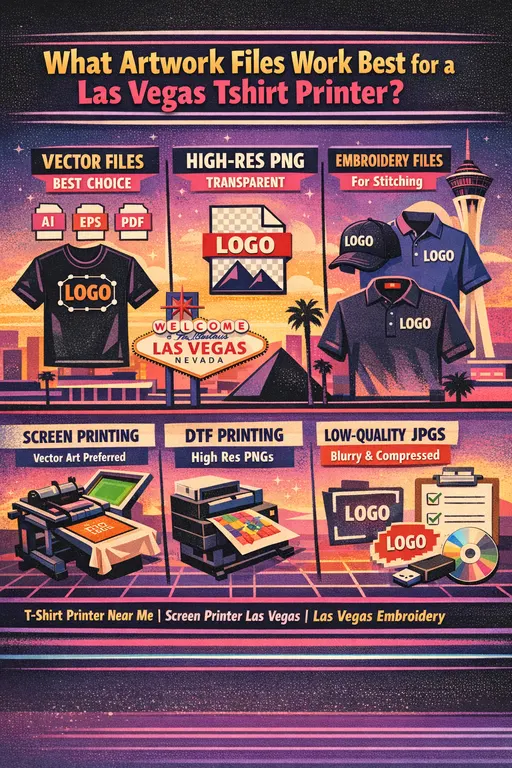
Learn what artwork files work best for a Las Vegas tshirt printer, including vector files, PNGs, embroidery files, and high-resolution artwork for screen printing, embroidery, and DTF printing Las Vegas orders.
When customers are ready to order custom apparel, one of the most common questions is simple: what kind of art file should I send? If you are working with a Las Vegas tshirt printer, sending the right file can make the process easier, faster, and more accurate from the very beginning. The quality of your artwork affects everything from print clarity and embroidery detail to turnaround time, setup costs, and how closely the final product matches your original vision.
Whether you are ordering shirts for a convention, staff uniforms for your business, school spirit wear, nonprofit event apparel, team shirts, or branded promotional items, your printer will need artwork that is clean, usable, and appropriate for the decoration method. A file that works well for screen printing may not be ideal for embroidery. A logo that looks fine on your phone may not hold up when enlarged for a full front print. Likewise, an image that prints well for DTF printing Las Vegas jobs may still need changes before it is ready for hats or polos.
At Accent T-Shirts, or any experienced screen printer Las Vegas businesses depend on, the artwork stage is one of the most important parts of the order. Good artwork helps avoid production delays, improves print quality, and reduces unnecessary setup time. If you have ever searched for a tshirt printer near me or embroidery near me, chances are you have also run into questions about vector files, transparent PNGs, resolution, and file preparation. This guide breaks it down in plain English so you know what works best and what to send before your next order.
Why Artwork Files Matter So Much
A lot of customers assume any logo file will work, but that is not always true. The file type you send has a direct impact on how your design is reproduced. A blurry screenshot, low-resolution social media image, or compressed photo may look acceptable on a small screen, but once it is printed on a shirt or digitized for stitching, the weaknesses become obvious.
A professional Las Vegas tshirt printer needs artwork that is clear enough to reproduce at the correct size and in the correct format. For screen printing, the art may need to be separated by color. For embroidery, the design often needs to be simplified and digitized into a stitch file. For custom t-shirts Las Vegas businesses order in bulk, even a small problem with artwork can create repeated issues across dozens or hundreds of garments.
Good files help with:
- sharper prints
- cleaner edges
- better color accuracy
- easier resizing
- fewer delays
- smoother proof approvals
- better embroidery results
- faster quoting and production
If you want great results, the art you provide should match the decoration method being used.
The Best File Type Overall: Vector Files
In most cases, the best artwork you can send to a Las Vegas tshirt printer is a vector file. Vector art is made from paths rather than pixels, which means it can be resized larger or smaller without losing quality. That makes it the gold standard for logos, text-based artwork, and most custom apparel production.
Common vector file types include:
- AI
- EPS
- SVG
These file types are especially useful for a screen printer Las Vegas customers use for full front logos, back prints, sleeve prints, and multi-size applications. A vector file allows the artwork to be scaled for a left chest print, then enlarged for a full back print, without becoming blurry or jagged.
Vector files are also helpful for las vegas embroidery because they give the digitizer a clean foundation to work from. Even though embroidery eventually uses a stitch file, starting from vector art is often best because the lines, shapes, and text are more precise.
If you have a logo designed by a graphic designer, ask whether you have an AI, EPS, or print-ready PDF version. That is often the best file to send first.
When PNG Files Work Well
PNG files can also work very well, especially for DTF printing Las Vegas jobs, DTG printing, and some simpler shirt graphics. A PNG is a raster image, which means it is made from pixels, but it has one major benefit: it can support a transparent background. That makes it useful for logos or art that should print without a white box around them.
A good PNG file should be:
- high resolution
- full size or close to print size
- exported with a transparent background
- clean around the edges
- not a screenshot
For many full-color or smaller-run jobs, a high-resolution PNG is perfectly usable. This is especially true when customers need detailed designs, photo-style graphics, or artwork for digital methods. If you are working with a tshirt printer near me and submitting art for a short-run order, a good PNG may be enough as long as the file is high quality.
That said, not all PNGs are equal. A tiny web image pulled from a website will not produce the same result as a large, properly exported transparent PNG from the original design file.
JPG Files: Sometimes Usable, But Not Ideal
JPG files are common, but they are usually not the best option. Because JPGs are compressed and do not support transparency, they tend to be less flexible for apparel printing. If the resolution is high enough, a JPG might still be usable for some kinds of art, but it is usually not the preferred format for a professional screen printer Las Vegas companies trust with branded apparel.
The most common issues with JPGs are:
- blurry edges
- white backgrounds
- compression artifacts
- poor resizing
- loss of detail in small text
If the only art you have is a JPG, send it anyway and let your printer review it. Sometimes it can be rebuilt, cleaned up, or converted into something more usable. But whenever possible, vector or high-resolution PNG files are better.
PDF Files Can Be Excellent
PDF files are sometimes overlooked, but they can be excellent if they were exported correctly. A PDF may contain vector art, embedded fonts, and layout information that makes it easier for your Las Vegas tshirt printer to use. Many businesses send logos in PDF format because that is how their designers package final artwork.
A PDF can be a strong option for:
- logos
- text-based designs
- sponsor sheets
- event shirt layouts
- simple brand marks
- print-ready one-color or multi-color art
Just remember that not all PDFs are vector-based. Some are simply raster images placed into a PDF wrapper. A good printer can usually tell the difference quickly.
Best Artwork for Screen Printing
For screen printing, clean and scalable art matters a lot. A screen printer Las Vegas customers rely on will typically prefer vector art because it allows clean color separations and accurate resizing. If your design includes solid shapes, text, logos, or limited spot colors, vector is usually best.
The ideal file setup for screen printing includes:
- vector artwork when possible
- fonts outlined or converted to curves
- colors identified clearly
- art sized proportionally
- no unwanted backgrounds
- high contrast for clean reproduction
Screen printing works best when artwork is not messy or overly low resolution. Thin lines, tiny text, and faded web graphics can cause issues. If your logo is meant to appear bold and crisp on shirts, send the highest quality file you have.
This matters even more for custom t-shirts Las Vegas companies order for events, staff, conventions, and promotions. If 100 shirts are being printed, any flaw in the art gets repeated 100 times.
Best Artwork for Embroidery
Embroidery is different from printing, so the file requirements are different too. For las vegas embroidery, the best starting point is still often vector art, but embroidery always requires digitizing. That means your logo must be translated into stitch instructions before it can be sewn onto hats, polos, jackets, or bags.
The best artwork for embroidery is:
- clean
- simple
- readable
- not overloaded with tiny detail
- free of gradients and photographic effects
Logos with very fine lines, very small text, or lots of shading may need to be adjusted before they stitch well. Even if the design looks perfect on a screen, thread behaves differently than ink. This is why customers searching for embroidery near me are often surprised to learn that not every printed logo is automatically embroidery-ready.
If you want the best embroidery results:
- send vector art if possible
- keep text readable
- avoid tiny details
- ask if the logo needs a simplified version for hats or left chest applications
A good embroidery file starts with good source art, but it also depends on whether the design is suitable for stitching in the first place.
Best Artwork for DTF Printing
DTF printing Las Vegas customers choose for small runs and full-color graphics is often more flexible than screen printing when it comes to artwork. DTF can reproduce detailed, colorful images more easily than traditional spot-color screen printing, especially on short runs or mixed garments.
For DTF, the best files are usually:
- high-resolution PNG with transparent background
- large file dimensions
- clean edges
- vibrant, accurate color
- art prepared at final or near-final size
DTF is great for:
- smaller quantity orders
- full-color logos
- gradient effects
- detailed graphics
- names and numbers
- mixed fabric garments
Because DTF handles detail well, it is a useful option when a customer does not have vector art but does have a clean, large transparent PNG. Still, quality matters. A poor-quality PNG will not magically improve because it is printed with DTF.
Common Artwork Problems That Cause Delays
One reason many customers feel frustrated is that they think they are ready to order, then discover their art needs work. Any experienced Las Vegas tshirt printer has seen the same common issues over and over.
Some of the most frequent artwork problems include:
- screenshots from a phone
- logos copied from a website
- files pulled from social media
- blurry images
- art with a background that should not be there
- missing fonts
- very small files
- incorrect colors
- low-resolution JPEGs
- artwork that is not sized correctly
These problems do not always mean the job cannot move forward, but they often slow things down. If the file needs to be recreated or cleaned up, that adds time before production can begin.
When customers search for a tshirt printer near me, they usually want quick answers and fast service. Sending good files from the start is one of the easiest ways to keep the project moving.
What If You Only Have a Screenshot or Small Logo?
This is extremely common, especially for small businesses, clubs, startups, and event organizers. Sometimes the only version of a logo available is a screenshot, a website image, or a small file from an old email. If that is all you have, send it. A good printer can often tell you whether it is usable, whether it needs redrawing, or whether a vector recreation is recommended.
If your artwork has to be recreated, that is often worth it in the long run. A clean vector version gives you a better foundation for:
- shirts
- polos
- hats
- jackets
- banners
- signage
- promotional items Las Vegas businesses order alongside apparel
Once a logo is properly rebuilt, it becomes much easier to reuse across multiple products and decoration methods.
Best Practices Before Sending Artwork
If you want to make life easier for your printer and get better results, follow a few simple best practices before sending files.
First, send the original file whenever possible. Do not just paste a logo into a Word doc or screenshot it from another source. If your designer gave you a package of files, send the full set.
Second, include notes about colors, garment type, and where the design will be placed. A front print may require different sizing than a left chest logo or hat design.
Third, ask whether the same art will be used for multiple methods. If you want shirts printed and polos embroidered, your Las Vegas tshirt printer may recommend one version of the art for printing and another for embroidery.
Fourth, send the highest quality version you have, even if you are not sure it is perfect. It is easier for a printer to evaluate a large file than a small one.
Why Better Artwork Saves Money Over Time
Some customers focus only on getting the order placed fast, but quality artwork also saves money over time. A clean file reduces setup headaches, avoids rework, and gives you something you can use again for future orders. If your logo is properly prepared once, it becomes easier to reorder shirts, add hats, switch to embroidery, or apply the same branding to promotional items Las Vegas companies use for trade shows and events.
That is especially valuable if your business places recurring orders. Consistency matters. Whether you are ordering uniforms now or event shirts later, a good art file helps keep your branding clean and professional every time.
Final Thoughts
So, what artwork files work best for a Las Vegas tshirt printer? In most cases, vector files like AI, EPS, SVG, or vector PDF are the best overall choice. They are scalable, clean, and flexible for screen printing, logo applications, and even embroidery preparation. High-resolution transparent PNG files are also very useful, especially for DTF printing Las Vegas jobs and other full-color digital printing applications. JPG files can sometimes work, but they are usually less ideal because of compression, backgrounds, and limited flexibility.
If you are ordering from a screen printer Las Vegas businesses trust, or looking for las vegas embroidery for polos, hats, and uniforms, the artwork you send can make a major difference in the final result. The better the file, the smoother the process. And if you are searching for a tshirt printer near me or embroidery near me, working with a local shop that can review your files and guide you through the process is often the best way to avoid mistakes.
The good news is that you do not have to know everything before reaching out. Send the best art you have, explain what you are ordering, and let your printer help you determine the best setup for screen printing, embroidery, DTF, or other branded apparel and product needs. Good artwork is the foundation of a good order, and starting with the right file makes everything easier from proof to production.